
Site hosted by Angelfire.com: Build your free website today!


Using xBase 3++ files with CGI scripts.


To use xBase 3 files with CGI scripts. We first need to understand what a Database is and how they work.
A Database is a collection of organized data. If you created a file with organized entrees. You could consider it a Database. Hear is an example.

Rogers
Joe
83

Johns
mick
14

Al-through most people think of a Database in a larger since.
  • A way to enter the data. Spreadsheet, HTML forms, and Forms.
  • A way to retrieve the data.
  • A way to search the data.
  • Automatic backups of the Database file.
  • And if using in a Multiuser Environments. -- File locking.
    But A Database is a collection of organized data "The file". How you put the data in or retrieve it is up to you.

    We are going to (1) Learn how xBase 3 files work. (2) How to enter data from a web form. (3) Ho to retrieve the data using a HTML form.

    (1) How xBase 3 files work.
    Using xBase 3 files is jest like using any file. To read and write them you need the format.

    xBase 3 has 2 structs. The first is DB_HEADER and it has

  • xBase version.
  • Whether there is a memo fields.
  • Year, Month, and Day last modified.
  • Number of records.
  • Offset to first record.
  • Each record length.
  • And a reserved fields.
  • This structure (struct) is used to describe the xBase file.
    typedef struct {
      unsigned int   Ver:7;            //xBase version. (2,3,4 for xBase)
      unsigned int   Memo:1;           //If true there is a memo field.
      unsigned int   Year_m:8;         //Year last modified.
      unsigned int   Month_m;          //Month last modified.
      unsigned int   Day_m;            //Day last modified.
      long int       Number_records;   //Number of records.
      short int      R_offset;         //Offset to first record.
      short int      R_length;         //Each record length.
      unsigned int   Reserved[20];     //Do not use.
    } DB_HEADER;    
    
    The secound decribes the column or field.
    typedef struct {
      char           column_name[11]  //Name of the column, upto 10 charters.
      char           char_type;       //Not used by most xBase files.
      //Used to determine the beginning of each column. (delete status first byte).
      long           res_field;       
      //Used to tell the format of the numbers in the column. (0 is integer, grater then 0 is a floating point).
      unsigned char  Col_length;      
      unsigned char  Col_type;        //What type of column this is.
      char           Reserved[14];    //Do not use.
    } DB_COLUMN;
    
    There are some defines we need to know too.
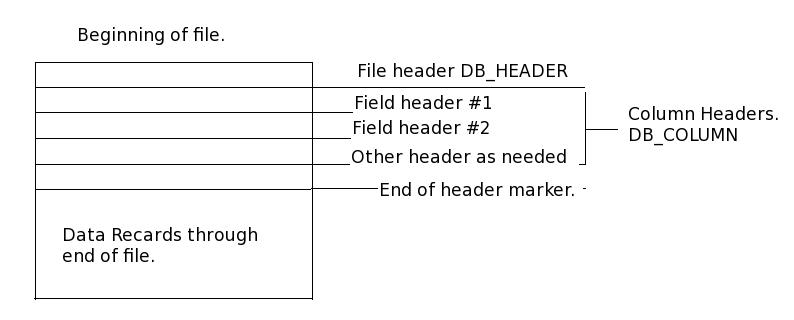
  • The record's status. Deleted or not.
  • The field (column) definitions. Number, character, logical, memo, date, float, or picture. Each of these fields is defined with 1 character. N, C, L, M, D, F, AND P.
    Some compilers pack to an 8 byte (1 bit) boundary. We wount to pack to 1 byte boundaries. If you open a windows bitmap (.bmp) or write an encryption program. You will need to use this directive. We will use a Pre-compiler detective
    #pragma pack(1) //Pack to byte boundaries.


    To write a xBase 3 file first we need a input form. Call it form1.html.
    <HTML>
    <HEAD>
    <TITLE> HTML xBase 3 programming. </TITLE>
    </HEAD>
    <BODY>
    <CENTER>xBase 3 entree form.</CENTER>
    First Name
    <FORM METHOD=POST ACTION="http://127.0.0.1/cgi-bin/xBase_input.cgi">
    <INPUT NAME="fname" TYPE="TEXT" SIZE=30>
    Last Name
    <INPUT NAME="lname" TYPE="TEXT" SIZE=30>
    Age
    <INPUT NAME="age" TYPE="TEXT" SIZE=4>
    <input type="submit" name="Send" VALUE="Run Script">
    </FORM>
    </BODY>
    </HTML>

    

    Create a link to it in your index.html file. Add this line
    <BR> <a href="form1.html" >FORM1</a>
    And the link will look like this.
    FORM1

    And form1.html will look like this.
    HTML xBase 3 programming.
    xBase 3 entree form.
    First Name
    Last Name Age

    I like to write the form first becouse it gives me an ideal of what the finished program will look like.
    Open you index file (http://127.0.0.1) and click on the FORM1 link.
    You will get a "Not Found". Since we have not wrote the CGI script yet. But we know that form1.html works.


    Lets write a CGI script.

    What does the CGI script need to do?

    To write.
  • Check to see if the script is open.
    If so. Loop tell it is not open or it times out.
  • After you open the script.
    Add the lock marker.
    Copy it to a temp file.
    Then close the original file and remove the lock marker.
    Do not work on the original.
  • Open the temp file.
    Add new data to end of file and close it.
  • Check to see if the original script is open.
    If so. Loop tell it is not open or it times out.
  • After you open the script.
    Add the lock marker.
    Copy the temp file to the original file.
    Then close the original file and remove the lock marker.
    Send a copy successful message. or Send a copy unsuccessful message.

  • Is file open.